Orders: handling duplicate, unpaid and cancelled orders
Képesbolt is constantly evolving, so you may see new settings in the interface that are not yet shown in this video or the images.
Last updated:
Video coming soon
You'll find incoming orders under Orders. In the settings you decide when the system should warn you and when it should send reminders.
Where to find it: Settings → Order management: duplicate, unpaid and cancelled orders
Set what you need, then click Save. You need owner permissions for this. A duplicate-order warning does not itself cancel an order. As an exception, a new order with the same email and galleries within 24 hours may cancel a previous unpaid online card order when the relevant conditions are met; paid orders and orders with an invoice or proforma are not eligible.
Duplicate orders
| Setting | Default | What it does |
|---|---|---|
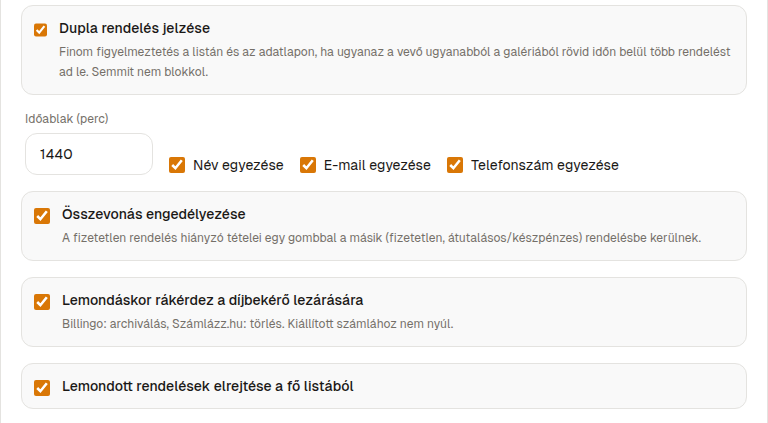
| Flag duplicate orders | On | Warns you when the same customer orders again from the same gallery within a short time. It only warns, it doesn't block. |
| Time window (minutes) | 1440 (1 day) | Between 5 minutes and 7 days. Orders within this window count as duplicates. |
| Match by name / Match by email / Match by phone | all On | How the system recognises the same customer. |
| Allow merging | On | Lets you manually move the items of an unpaid order into another unpaid bank transfer or cash order. |
Cancelled orders
| Setting | Default | What it does |
|---|---|---|
| Ask about closing the proforma when cancelling | On | When you cancel, offers to close the proforma invoice: archives it in Billingo, deletes it in Számlázz.hu. Issued invoices are never touched. |
| Hide cancelled orders from the main list | On | Keeps the list easier to scan. |
Unpaid orders and reminders
| Setting | Default | What it does |
|---|---|---|
| “Overdue payment” view | On | Shows late payments in a separate list. |
| Overdue after (days) | 7 days | Between 1 and 180 days. |
| Automatic payment reminder | Off | When on, the system reminds the customer automatically. You can always send a reminder manually, regardless of this setting. |
| First reminder after the order (days) | 3 | Between 1 and 60. |
| Days between further reminders | 4 | Between 1 and 60. |
| Maximum automatic reminders | 2 | Between 1 and 5. |
You can edit the reminder email in the Hungarian template and English template fields (Subject: up to 200 characters, Text: up to 3,000 characters; neither can be left empty). The system fills in these placeholders:
{customer_name} customer name · {order_number} order number · {total} order total · {pay_link} payment link · {shop} your shop name · {days} days elapsed
If you edit the text, keep {pay_link} in it, otherwise the customer can't pay with a single click.
Unfinished card payments
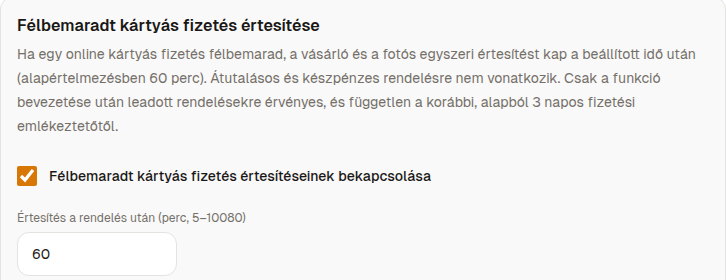
If a customer starts a card payment but doesn't finish it, the system notifies both them and you once.
| Setting | Default | What it does |
|---|---|---|
| Enable unfinished card payment notifications | On | Only applies to online card orders. |
| Notify after the order (minutes) | 60 | Between 5 minutes and 7 days. |
| Customer email in Hungarian / Customer email in English | built-in template | You can edit the subject and text. Besides the placeholders above, you can also use {minutes}. |
This feature is independent of the general payment reminder.